Custom Drawing Functions
Custom drawing lets an application receive the calculated barcode elements and render them with its own drawing or output functions. It is also the recommended method for special devices or output targets that cannot use a standard driver, such as laser marking equipment or OS/400 printers.
TBarCode Library supports two custom drawing methods. An application can either draw the individual barcode elements from their calculated positions and sizes, or process the barcode row by row as a metadata pattern.
Custom drawing callbacks require a valid TBarCode SDK Developer license and are disabled in the demo version. To evaluate them, request a temporary license key from support@tec-it.com. The How to License TBarCode SDK chapter describes how to apply a license.
Choosing a Custom Drawing Method
| Method | Recommended use |
|---|---|
| Individual barcode elements | Preferred for new integrations and custom output routines that can draw bars, text, rings, hexagons, and colored elements from their calculated geometry |
| Metadata patterns | Suitable for existing pattern-based integrations and devices that process a barcode as rows of modules, bars, and spaces |
Common Calling Sequence
Use the following sequence for both custom drawing methods:
- Set all barcode properties and data, call
BCCreate(), and continue only if it returnsErrOk. - Register the required callbacks, for example with
BCSetFuncDrawBar()orBCSetFuncDrawRow(). - Optionally use
BCSetCBData()to make application-specific data available to the callbacks. - Define the barcode bounding rectangle and call
BCDrawCB().
Drawing Individual Barcode Elements
TBarCode Library calculates the position and size of each barcode element and passes this information to the registered callback. The application can then draw the element with its own graphics or output functions.
Register the callbacks required by the supported barcode types:
BCSetFuncDrawBar()handles normal bars, dots, and modules.BCSetFuncDrawColoredBar()handles the colored Swiss cross in Swiss QR Code.BCSetFuncDrawText()handles the human-readable text.BCSetFuncDrawRing()handles MaxiCode finder rings.BCSetFuncDrawHexagon()handles MaxiCode hexagons.
Register all callbacks needed for the barcode types and options used by the application. For example, an application that displays human-readable text must also provide a text callback.
C/C++ Sample: Receiving Individual Elements
The following example receives the position and size of every bar or module
and writes the values to the console. Replace printf() with the drawing or
output function required by the application. The example assumes that
BCCreate(pBC) has already returned ErrOk.
#include <stdio.h>

ERRCODE CALLBACK PrintBarGeometry(
    VOID*, HDC, DOUBLE x, DOUBLE y, DOUBLE width, DOUBLE height)
{
    printf("Bar: x=%f, y=%f, width=%f, height=%f\n",
           x, y, width, height);
    return ErrOk;
}

ERRCODE RunElementCallbacks(t_BarCode* pBC)
{
    RECT rect = {0, 30000, 50000, 0}; // 50 x 30 mm
    ERRCODE eCode = BCSetFuncDrawBar(pBC, PrintBarGeometry);
    if (eCode != ErrOk)
        return eCode;

    return BCDrawCB(pBC, NULL, &rect);
}
Processing Barcode Rows as Metadata Patterns
Use BCSetFuncDrawRow() when the output target processes a barcode as rows of
modules, bars, and spaces. The row callback is invoked once for each barcode
row. Call BCGetMetaData() inside that callback to read the current row
pattern. The metadata is valid only during the callback.
C/C++ Sample: Reading Row Patterns
The following example reads and prints each metadata pattern while its row
callback is running. It assumes that BCCreate(pBC) has already returned
ErrOk.
#include <stdio.h>

ERRCODE CALLBACK PrintRowPattern(
    VOID*, t_BarCode* pBC, HDC, HDC,
    DOUBLE, DOUBLE, DOUBLE, DOUBLE)
{
    LPCSTR pattern = BCGetMetaData(pBC);
    if (pattern != NULL)
        printf("%s\n", pattern);
    return ErrOk;
}

ERRCODE RunRowCallback(t_BarCode* pBC)
{
    RECT rect = {0, 30000, 50000, 0}; // 50 x 30 mm
    ERRCODE eCode = BCSetFuncDrawRow(pBC, PrintRowPattern);
    if (eCode != ErrOk)
        return eCode;

    return BCDrawCB(pBC, NULL, &rect);
}
Metadata Pattern Format
TBarCode Library represents a barcode as a device-independent metadata pattern that specifies where to draw bars and spaces.
The pattern uses uppercase and lowercase letters:
- Uppercase letters represent bars or dots.
- Lowercase letters represent spaces.
- The letter itself (
A,B,C, and so on) specifies the width of the bar or space.
In this chapter, X denotes the module width. For linear barcodes, it is the width of the narrowest bar or space. For matrix codes, it is the width and height of one module.
Linear and Stacked Barcodes (e.g., PDF417)
For barcodes that use multiple bar or space widths, the callback receives different uppercase or lowercase letters. Each letter corresponds to an entry in the current print ratio. The following table uses 1:2:3:4 as an example.
| Width factor | Bar | Space | Actual width |
|---|---|---|---|
| 1 | A |
a |
1 x X |
| 2 | B |
b |
2 x X |
| 3 | C |
c |
3 x X |
| 4 | D |
d |
4 x X |
The actual width factors depend on the current print ratio. If a print ratio defines additional factors, the pattern continues with E and e and the following letters.
Each barcode symbology has a predefined print ratio, which the user can adjust. Code 39, for example, uses 1:3:1:3:
A: 1 xXB: 3 xXa: 1 xXb: 3 xX
Use BCGetRatioString, BCGetRatioHint, BCGetCountBars, and BCGetCountSpaces to query the ratio and the number of bar and space widths for a symbology.
2D Matrix Codes (Data Matrix, QR Code®, Aztec Code, etc.)
Two-dimensional matrix codes consist of several rows. TBarCode Library passes the pattern for each row separately to the registered row callback, which draws that barcode row.
The row pattern uses uppercase letters for black modules and lowercase letters for white modules. A represents a black module, and a represents a white module.
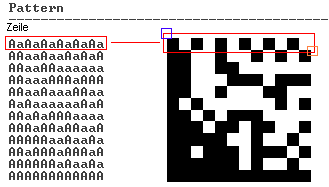
The example shows Data Matrix. QR Code and Aztec Code use the same pattern principle.
About Drawing
The pattern contains no absolute sizes. Matrix modules represented by A and a have the same width and height, X. Adjust X to the dot or pixel size of the target device to minimize printing tolerances.
Postal Codes with Bars of Different Height
Unlike other linear barcodes, many postal symbologies use bars of different heights rather than bars of different widths. The callback receives digits instead of letters.
Each digit represents one bar followed by one space. All bars and spaces have a width of 1 x X, but the bar heights differ. Depending on the symbology, the pattern contains two, three, or four different digits.
Barcodes with Two Different Heights
These barcodes use long and short bars with the same baseline. Both grow upwards:
0: long bar1: short bar

Barcodes with Three Different Heights
These barcodes use full-height bars and short bars that grow either downwards from the top or upwards from the baseline:
0: full-height bar1: short bar growing downwards2: short bar growing upwards
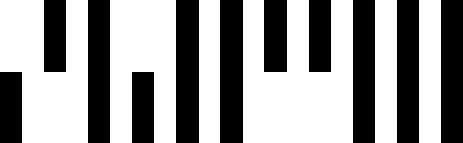
Barcodes with Four Different Heights
These barcodes use full-height bars, ascenders, descenders, and centered tracker bars:
0: full-height bar (Full)1: medium bar growing downwards (Ascender)2: medium bar growing upwards (Descender)3: short centered bar (Tracker)

About Drawing
The pattern contains no absolute sizes. A bar is defined by its height and its distance from the upper edge, both expressed as percentages of a full-height bar. Each table entry lists height / distance from upper edge.
| Barcode types | Digit 0 |
Digit 1 |
Digit 2 |
Digit 3 |
|---|---|---|---|---|
| US Postal, CEPNet, Planet | 100% / 0% | 38.5% / 61.5% | - | - |
| Pharmacode Two-Track | 100% / 0% | 50% / 50% | 50% / 0% | - |
| Australian Postal | 100% / 0% | 62% / 0% | 62% / 38% | 24% / 38% |
| Royal Mail 4-State, KIX | 100% / 0% | 62.5% / 0% | 62.5% / 37.5% | 25% / 37.5% |
| Intelligent Mail® Barcode, DAFT, Japanese Postal | 100% / 0% | 66.7% / 0% | 66.7% / 33.3% | 33.3% / 33.3% |
Control Patterns
In addition to letters and digits, a metadata pattern can contain control bytes.
Protruding Bars for EAN and UPC Codes
| Control byte | Hexadecimal | Meaning |
|---|---|---|
| 254 | 0xFE |
Begin a section with long, protruding bars |
| 255 | 0xFF |
End the section with protruding bars |
| 253 | 0xFD |
Begin an add-on section that continues to the end of the symbol |
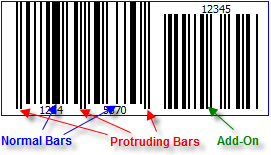
EAN-8, EAN-13, UPC-A, and UPC-E contain protruding bars at the beginning, middle, and end of the symbol. Control byte 254 begins a protruding-bar section; control byte 255 ends it. The following bars use their normal height. Protruding bars extend downwards by approximately half the height of the human-readable text. By default, TBarCode Library determines the additional length automatically. Use BCSetNotchHeight() (Notch Height) to adjust this length.
Control byte 253 begins an add-on section. Add-on bars leave space for the text above the symbol and align at the bottom with the protruding bars.
Incrementing and Decrementing Bar Width for EAN and UPC Codes
| Control byte | Hexadecimal | Meaning |
|---|---|---|
| 252 | 0xFC |
Begin bar-width increment |
| 251 | 0xFB |
End bar-width increment |
| 250 | 0xFA |
Begin bar-width decrement |
| 249 | 0xF9 |
End bar-width decrement |
EAN and UPC specifications require some bars to be wider and others to be narrower. The control bytes above mark the corresponding sections in the metadata pattern.
See the applicable EAN or UPC specification for details.