Barcode Class
Use the Barcode class to generate barcodes in your application. You can draw
into a Windows Forms graphics context, save an image to a file, or create a
bitmap for further processing.
This example draws a Data Matrix barcode in a Windows Forms application using
TECIT.TBarCode.dll. It assumes that TBarCode SDK is installed with the .NET
component and that you are familiar with C#.
Choose the Assembly
An assembly is a .dll file that you add to your .NET project as a reference.
| Assembly | Use |
|---|---|
TECIT.TBarCode.dll |
.NET Framework applications. Contains the barcode class and the Windows Forms and ASP.NET Web Forms controls. Use this assembly for the following example. |
TECIT.TBarCode.Std.dll |
Applications with a target framework compatible with .NET Standard 2.0. Contains the barcode class without the Windows Forms or ASP.NET Web Forms controls. |
Both assemblies use the TECIT.TBarCode namespace for the barcode class.
Choose the assembly based on the target framework and required controls. Both
assemblies support 32-bit and 64-bit .NET projects.
TBarCode SDK installs both assemblies in the following directories by default:
- 64-bit applications:
C:\Program Files\Common Files\TEC-IT\TBarCode\11.17 - 32-bit applications:
C:\Program Files (x86)\Common Files\TEC-IT\TBarCode\11.17
Create the Project and Add a Reference
- Create a C# Windows Forms App (.NET Framework) project in Visual Studio.
Name it
BarcodeExample. - In Solution Explorer, right-click References and select
Add Reference. Browse to the corresponding TBarCode installation
directory listed above and select
TECIT.TBarCode.dll. - Confirm the reference.
The native TBarCode library must also be available to the application. It must
match the application's process architecture: TBarCode11.dll
for x86 or TBarCode11_x64.dll for x64. The SDK setup installs
these libraries.
Draw the Barcode on the Form
Replace the contents of Form1.cs with the following code. If your project has
a different name, use its namespace in place of BarcodeExample.
using System;
using System.Drawing;
using System.Windows.Forms;
using TECIT.TBarCode;

namespace BarcodeExample
{
    public partial class Form1 : Form
    {
        private readonly Barcode barcode;

        public Form1()
        {
            InitializeComponent();
            SetStyle(ControlStyles.ResizeRedraw, true);
            MinimumSize = new Size(100, 100);

            barcode = new Barcode();
            barcode.BarcodeType = BarcodeType.DataMatrix;
            barcode.Data = "Here is some random content for my sample barcode.";

            Paint += Form1_Paint;
            Disposed += Form1_Disposed;
        }

        private void Form1_Paint(object sender, PaintEventArgs e)
        {
            Rectangle bounds = ClientRectangle;
            bounds.Inflate(-20, -20);
            if (bounds.Width <= 0 || bounds.Height <= 0)
                return;

            barcode.BoundingRectangle = bounds;

            try
            {
                barcode.Draw(e.Graphics);
            }
            catch (BarcodeException ex)
            {
                e.Graphics.DrawString(ex.Message, Font, Brushes.Red,
                    ClientRectangle);
            }
        }

        private void Form1_Disposed(object sender, EventArgs e)
        {
            barcode.Dispose();
        }
    }
}
The constructor creates and configures the barcode. The Paint handler draws
it inside the form with a margin of 20 pixels. Register this handler once, as
shown in the constructor. Resizing the form causes it to be redrawn.
The Disposed handler releases the barcode when the form is disposed. Keep
the barcode alive while the form uses it. The Graphics object supplied by
PaintEventArgs belongs to Windows Forms; your handler does not dispose it.
Run the Application
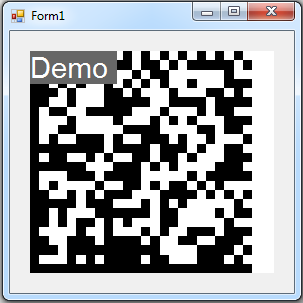
Select Start Debugging to run the application. The form displays the Data Matrix barcode. Without a valid license, the output can include a demo marker, as shown below.
Save a Barcode Image
Use Draw(filename, imageType) to save the barcode as an image file. The
following code snippet creates a Data Matrix barcode and writes it to
barcode.png:
using (Barcode barcode = new Barcode())
{
    barcode.BarcodeType = BarcodeType.DataMatrix;
    barcode.Data = "Sample barcode data";
    barcode.BoundingRectangle = new Rectangle(0, 0, 240, 240);
    barcode.Draw("barcode.png", ImageType.Png);
}
The file is created in the application's current working directory. To save it
elsewhere, pass a full path. For PNG output, BoundingRectangle specifies the
width and height in pixels.
Create a Bitmap or PNG in Memory
Use DrawBitmap() to create a Bitmap object. You can display or save it with
the standard .NET image methods. Dispose of the bitmap when it is no longer
needed.
To create a PNG in memory, save the bitmap to a MemoryStream. The following
code snippet returns the PNG as a byte array:
using System.Drawing;
using System.Drawing.Imaging;
using System.IO;
using TECIT.TBarCode;

// ...

private byte[] CreateBarcodePng()
{
    using (Barcode barcode = new Barcode())
    {
        barcode.BarcodeType = BarcodeType.DataMatrix;
        barcode.Data = "Sample barcode data";
        barcode.BoundingRectangle = new Rectangle(0, 0, 240, 240);

        using (Bitmap bitmap = barcode.DrawBitmap())
        using (MemoryStream stream = new MemoryStream())
        {
            bitmap.Save(stream, ImageFormat.Png);
            return stream.ToArray();
        }
    }
}
The using blocks automatically release the barcode, bitmap, and stream after
use.
Handle Barcode Errors
TBarCode reports barcode-generation errors through BarcodeException. The
form example above shows how to catch this exception and display its message.
Use the same approach when saving a barcode.
Use IsDataValid() to check the input before drawing or saving the barcode:
if (!barcode.IsDataValid(out Exception error))
{
    MessageBox.Show(error.Message);
    return;
}
API Reference
For detailed information about the available methods, properties, parameters, and supported output types, see the TBarCode .NET Developer Reference.