Core Concepts
The following terms describe how TFORMer organizes form layouts and dynamic data.
Relationship Overview
A form layout can be organized as a stand-alone form or as a repository-based form:
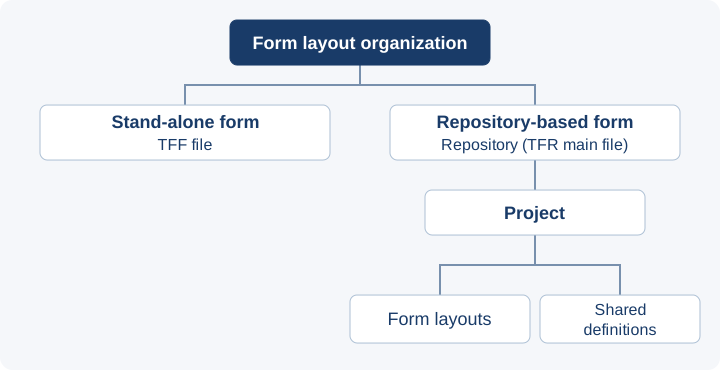
- Stand-alone TFF: Use separate files for independent labels or forms that do not need shared definitions.
- Repository: Group related layouts into projects when they share data-field or data-source definitions, or need a common organizational structure.
Form Layout
A form layout is a document created with TFORMer Designer. It defines the document's appearance and behavior, including its structure, positions, fonts, colors, static content, and references to dynamic data.
Stand-Alone Form
A stand-alone form uses a TFF file and is not stored in a repository. For output, select the TFF file; no project or form layout name is needed.
Repository
A repository stores multiple form layouts together with shared definitions such as data sources and data fields. Its main file uses the TFR file extension.
When using a repository-based form, the application identifies:
- the repository;
- the project within the repository; and
- the form layout within the project.
Repository-based layouts can have associated directories and files. Copying and deployment requirements depend on the repository's structure and dependencies; see Distribution of TFORMer Document Layouts.
Project
A repository is divided into projects. A project groups one or more form layouts with shared data-field and data-source definitions. Group layouts in the same project when they use the same project-level definitions.
Definitions in a user-defined project are available only to form layouts in that project. To share definitions across projects, use the global project.
By default, TFORMer Designer stores a project's form layouts in a project-specific subfolder of the repository's Forms directory. Keep this directory structure when distributing a repository; see Distribution of TFORMer Document Layouts.
Global Project
A repository and a stand-alone form each have exactly one global project, available by default. It groups data-field and data-source definitions and is called GlobalProject in the object-oriented APIs.
- Repository: Global definitions are available to form layouts in all projects. The global project does not contain form layouts; store those in user-defined projects.
- Stand-alone TFF: The global project contains the form layout and its definitions. There are no additional user-defined projects.
The native C API has no separate GlobalProject object. Query global definitions through its repository functions; see Repository Access in the Native C API reference.
Data Field
A data field is a placeholder for dynamic data in a form layout. At output time, TFORMer replaces the placeholder with the current value supplied by a data source. Data fields can also be used in expressions.
A stand-alone TFF file contains its own data-field definitions. In a repository, forms within the same project can share project-level data-field definitions. Global data fields are available to forms in all projects of that repository.
Data Source
A data source supplies the dynamic values used by the data fields in a form layout. The supported data-source types and their behavior can depend on the selected interface.
Repository API
In the object-oriented interfaces (.NET, Java and COM), the Repository API provides common access to TFR repositories and stand-alone TFF files. Applications can access projects, form layouts, data-field definitions and data-source definitions through this common object model.
For supported editing and saving operations, see your interface's Repository class, for example the .NET Repository class. This API is not a layout editor: create or change a layout's visual design with TFORMer Designer.
Naming Rules
Use these rules when naming projects, form layouts, data fields and data sources:
- Start with an ASCII letter (
AtoZoratoz) or an underscore (_). - Use only these letters, digits (
0to9) and underscores for the remaining characters. - Do not use spaces, tabs, hyphens, accented letters or special characters such as
$,&,<,>,(or).
Examples of the character rules:
| Name | Result |
|---|---|
MyDataField |
Valid |
_0MyDataField |
Valid: an underscore may precede a digit. |
MyData_Field |
Valid |
3MyDataField |
Invalid: starts with a digit. |
MyData Field |
Invalid: contains a space. |
Data-field names must also avoid reserved expression names and function names, and must not duplicate a data-field name already defined in the project or its global project. Matching the character rules alone does not establish that a name is available.
These rules concern object names, not data-field values or filesystem paths. Use them rather than assuming that every identifier allowed by your programming language is a valid TFORMer name.
Related Designer Term: Template
A template is a form layout used in TFORMer Designer as the starting point for a new form layout. Templates are Designer-owned authoring aids and are also installed with the SDK. Their default location is C:\ProgramData\TEC-IT\TFORMer\9\Templates.
Use TFORMer Designer to create a layout from a supplied template or to save your own templates. Do not edit the files in the template directory directly. See the TFORMer Designer manual for template management and changing the template directory.
At runtime, select the resulting form layout, not the template, to generate output.